Replace Print Shop Spreadsheets With a Management System That Scales
You built your business on spreadsheets, but missed orders, broken formulas, and zero visibility cost you money every week. You don't need to start over. You need a connected print shop system that imports your data and connects everything.
Why Do Print Shops Still Use Spreadsheets?
Print shops often start with spreadsheets because they are easy to set up and flexible. But as orders, inventory, and production grow, spreadsheets become harder to manage, prone to errors, and disconnected from real-time operations.
In simple terms, spreadsheets work for tracking data - but not for running a print shop. This is where a complete print shop management system becomes necessary.
No real-time sync
Spreadsheets are static. By the time you update a count, it's already wrong.
Multi-user chaos
Two people editing the same sheet means conflicting versions and lost data.
Nothing is connected
Orders, inventory, production, and customers live in separate tabs with no link between them.
Fragile formulas
One wrong edit breaks pricing, totals, or reporting for the entire sheet.
Impossible to train
New employees take weeks to understand your spreadsheet system - and still make mistakes.
Zero visibility
You can't answer basic questions without digging through multiple sheets and tabs.
Sound Familiar?
If you recognize these, your spreadsheets are the bottleneck.
Someone edits row 342 and breaks the entire pricing formula.
One accidental change cascades through the sheet. You don't notice until a customer gets quoted the wrong price - or worse, you lose money on a job.
Two people update the same file - now you have conflicting versions.
The office updated the order sheet. Production updated their copy. Neither matches. Nobody knows which is right.
You can't answer basic questions without digging through multiple sheets.
"How many orders shipped this week?" "What's our revenue this month?" 20 minutes of filtering, copying, and cross-referencing to get a number you should see instantly.
New employee takes 3 weeks to learn your spreadsheet system.
Color-coded tabs, hidden columns, custom formulas that only the owner understands. Training is a nightmare because there is no system - just a collection of files.
Customer calls asking about their order - you open 4 tabs to find the answer.
Order status in one sheet. Tracking in another. Payment in a third. By the time you find the info, the customer is frustrated and you look disorganized.
What You're Tracking in Spreadsheets - and Why It Breaks
Every print shop tracks the same things. In a spreadsheet, they're disconnected tabs. In a print shop management software, they're one connected system.
Orders & Jobs
Status not synced - production doesn't know what's approved, office doesn't know what shipped.
Real-time order tracking from intake to delivery. Every department sees the same status.
Inventory
Outdated counts. You find out you're out of stock when the job is already on the press.
Live stock levels with automatic allocation. Counts update as blanks are received and used.
Production
No visibility into what's printing, what's queued, or what's late. You walk the floor to find out.
Job tracking by department with real-time status. Your team knows what's next without asking.
Quotes & Pricing
Manual calculations with fragile formulas. Inconsistent pricing across sales reps.
Automated quote generation with pricing matrices. Every quote is accurate and consistent.
Customers & Vendors
Contact info scattered across sheets, emails, and sticky notes. No relationship history.
Unified CRM with order history, communication logs, and vendor management in one place.
Invoicing & Payments
Manually creating invoices from order data. Payments tracked in a separate file.
Invoices generated automatically from completed orders. Payment status tracked in real time.
Spreadsheets vs. a Connected Print Shop System
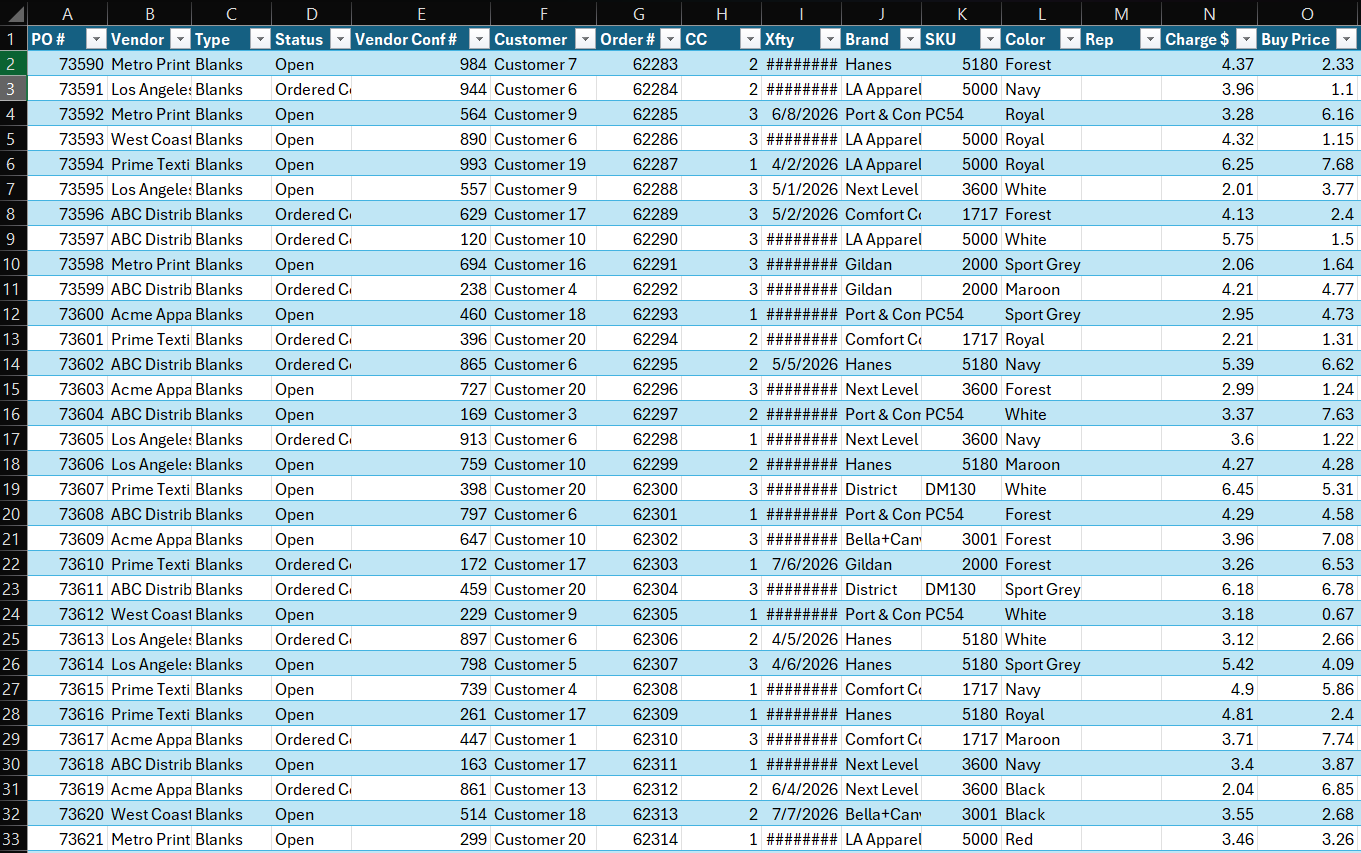
Spreadsheets
- closeData scattered across multiple files and tabs
- closeManual updates that are outdated by the time they're done
- closeNo connection between orders, inventory, and production
- closeBroken formulas and version conflicts
- closeWeeks of training for new employees
- closeNo real-time visibility into operations
- closeReports require hours of manual assembly
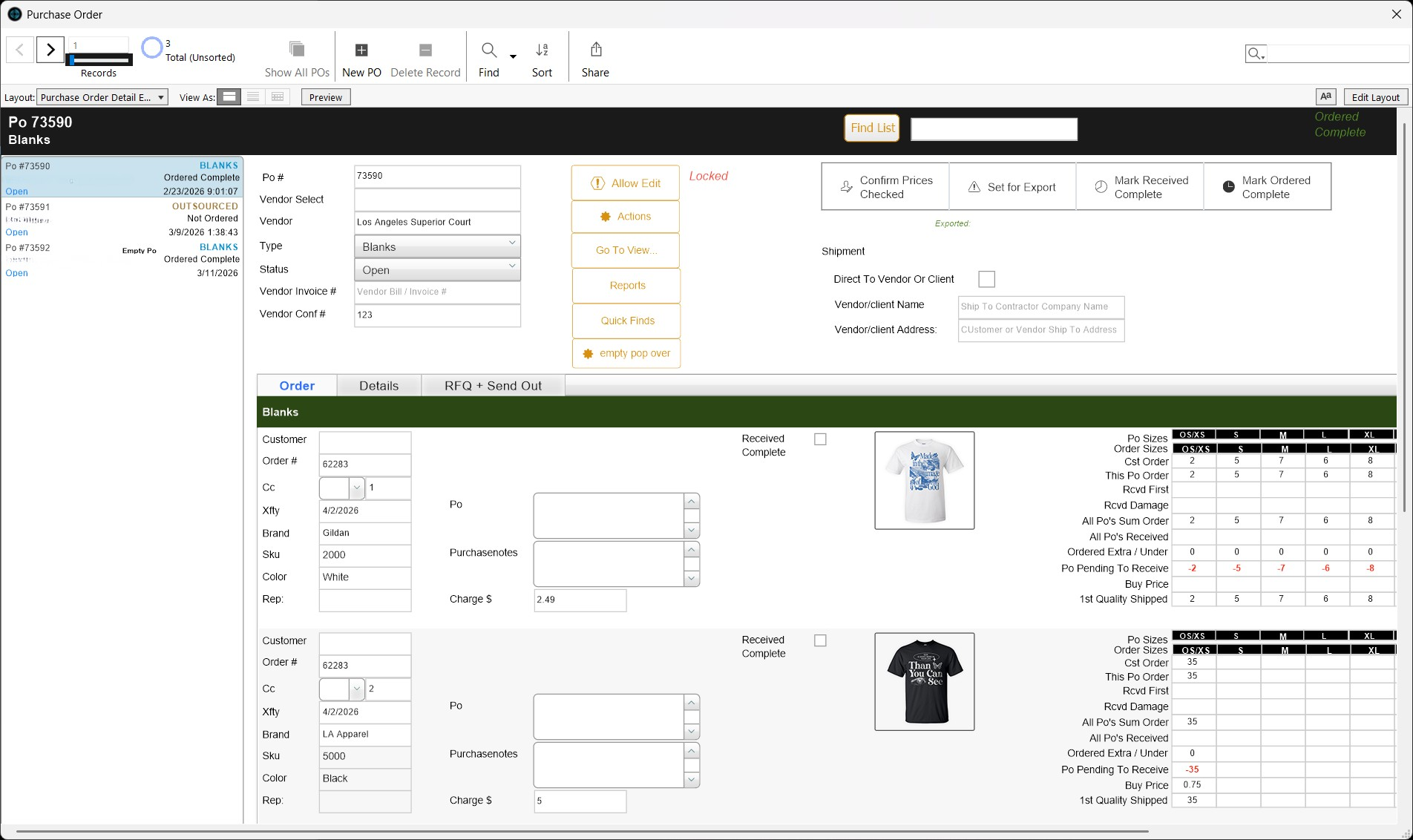
Shop Titan - Connected System
- checkEverything in one platform - orders, inventory, production, customers
- checkReal-time updates as events happen
- checkOrders automatically create production jobs
- checkInventory adjusts when stock is received or used
- checkNew employees follow guided workflows from day one
- checkInstant visibility into every job and department
- checkReports generated on demand - no assembly required
You Don't Lose Your Data - We Structure It
We don't rebuild your data - we structure it. Your existing spreadsheets become your starting point. Customers, products, pricing, vendor info - everything is imported and organized into a connected system.
You run both systems in parallel during the transition. Nothing is lost. Nothing is rushed.
Export
Export your existing spreadsheets - orders, customers, products, pricing, vendors. We tell you exactly what we need.
Clean
We review your data for duplicates, inconsistencies, and formatting issues. You approve before anything is imported.
Import
Data imported into the system - structured, connected, and ready. Customers link to orders. Products link to inventory.
Verify
You verify the data is correct. Run both systems in parallel. Compare results. Build confidence before switching.
Go Live
Spreadsheets retired. Your team runs on a connected print shop workflow system. Live support throughout the transition.
From Manual Tracking to a Connected System
The real problem with spreadsheets isn't the data - it's the disconnect. When you replace spreadsheets with a connected system, everything talks to everything else.
Orders flow without manual entry
Website orders automatically create jobs in the system. No re-keying from one sheet to another. Specs, quantities, and deadlines arrive with the order.
See the ecommerce storefront →Inventory adjusts in real time
Stock counts update when blanks are received, allocated, or used in production. No manual counting. No outdated spreadsheet numbers.
See inventory management →Production updates automatically
Jobs move through departments with status updates at every stage. Your team knows what's printing, what's next, and what's late - without a whiteboard.
See production management →Reports generate instantly
Revenue, production output, inventory levels, and customer history - on demand. No formulas, no assembly, no 20-minute data hunts.
See the FileMaker system →Frequently Asked Questions
Can I replace my print shop spreadsheets with software?
expand_more
Yes. A print shop management system replaces spreadsheets for orders, inventory, production tracking, quoting, and customer management - with everything connected in real time instead of scattered across files.
How do I migrate from spreadsheets to a print shop management system?
expand_more
We import your existing spreadsheet data - customers, products, pricing, vendor info - into the system during onboarding. Your spreadsheets become the starting point, not something you lose.
What's better than spreadsheets for managing a print shop?
expand_more
A connected system where orders, inventory, production, and your website share the same data. Unlike spreadsheets, changes happen in real time - no version conflicts, no broken formulas, no manual updates.
How long does it take to switch from spreadsheets?
expand_more
Typical deployment takes 2-4 weeks. That includes data import, system configuration, workflow mapping, and team training. You run both systems in parallel until the transition is complete.
Will I lose my data when switching from spreadsheets?
expand_more
No. We don't rebuild your data - we structure it. Your existing spreadsheets are exported, cleaned, and imported into the system. Nothing is lost - it's organized into a connected platform.
What print shop data can be imported from spreadsheets?
expand_more
Customer lists, product catalogs, pricing matrices, vendor information, inventory counts, and order history. If it exists in a spreadsheet, it can be structured and imported.
See How Your Print Shop Runs Without Spreadsheets
From manual tracking to a connected print shop management software - orders, inventory, production, and your website in one system. Your spreadsheets got you here. A system takes you further.
Explore the platform