Production without walking the floor
Every member shop runs on a print shop production management system we build and run for them. Every job tracked from art approval to shipment. Know what's printing, what's next, and what's late - without walking the floor. Screen printing production tracking, rush orders, and multi-method routing - handled by your tech team in one connected system.
Already running in member shops. We wire it in 2-4 weeks once you're approved.
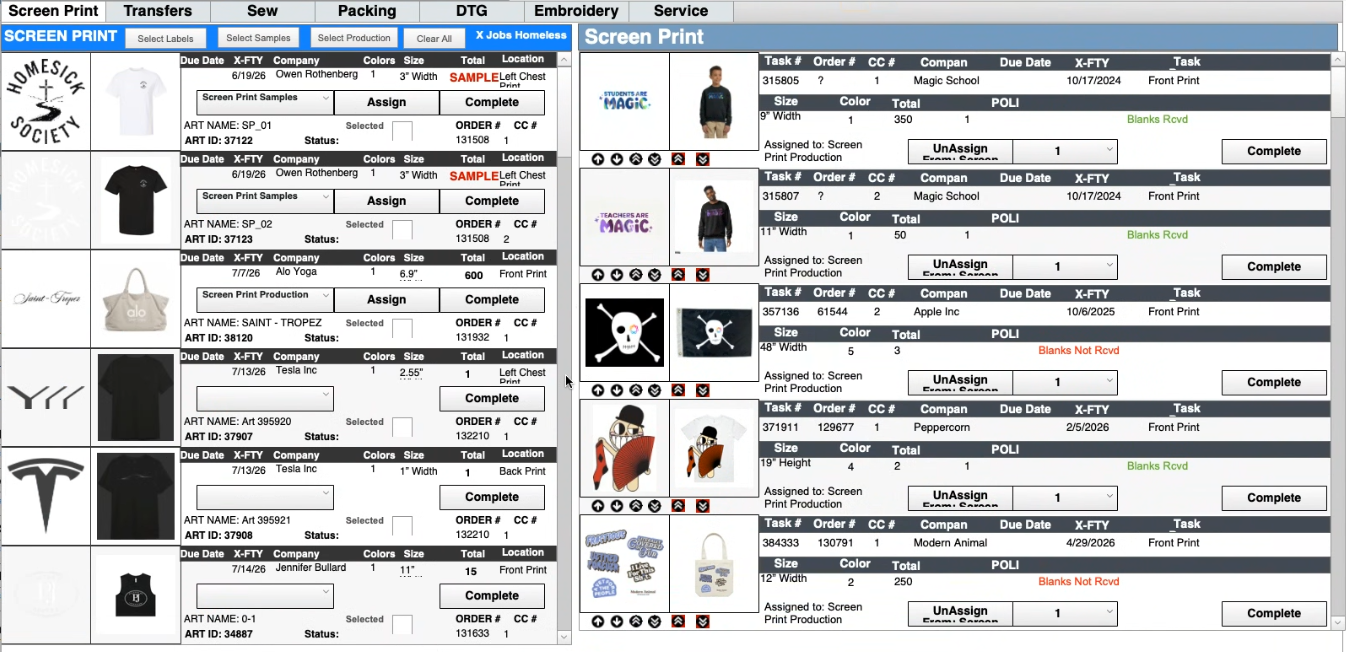
What Is Print Shop Production Management?
Print shop production management is the process of tracking and controlling every job from art approval to shipment - including scheduling, task assignment, and real-time status updates across departments like screen printing, DTG, and embroidery.
In the network, we replace whiteboards, spreadsheets, and manual check-ins with a system we run for you - exactly what's in production, what's next, and what's at risk.
Real-time job board
See every job's status - queued, in production, in QC, shipped - on a board we keep live, without asking anyone or walking the floor
Production scheduling
We organize jobs by priority, deadline, and print method so your team knows exactly what runs next
Task assignment
We route each department only their work - screen printing, DTG, embroidery, finishing - with clear handoffs between stations
Rush order routing
We wire rush jobs to flag and reprioritize automatically - other deadlines recalculated so nothing is silently pushed late
Quality checkpoints
We build QC gates into your workflow so jobs are verified before moving to the next stage - catching errors before they ship
Throughput analytics
We track jobs per day, bottlenecks, on-time rates, and department performance over time
Production is one piece of everything we run for member shops - see how it fits inside the complete print shop management system. Built and run on our FileMaker system. Want a closer look at scheduling? Read the production scheduling deep-dive.
What Print Shop Production Problems Actually Look Like
If any of these sound familiar, your production process is the bottleneck.
A job sits in art approval while production assumes it's ready.
The press is set up, the blanks are pulled, but the art was never approved. Nobody checked. Now you're resetting for a different job and losing 45 minutes.
The press operator asks "what's next?" and no one knows.
There's a whiteboard, maybe a clipboard. But the priorities changed after lunch and nobody updated either one. The operator picks a job - it might be the wrong one.
Rush orders push everything else behind without visibility.
A rush job jumps the line. Three other deadlines slip. Nobody knows which customers are now at risk until someone calls asking where their order is.
Jobs move between departments with no handoff.
Screen printing finishes a job. It sits on a cart. Finishing doesn't know it's there. The customer calls on Friday asking for tracking. It hasn't shipped.
You only find out a job is late after the customer complains.
No dashboard. No alerts. No proactive visibility. By the time you know there's a problem, the customer already knows too.
Print Shop Production Scheduling & Job Tracking - What We Run for You
For a step-by-step walkthrough of how we handle capacity, rush impact, and bottlenecks for member shops, see the production scheduling deep-dive.
visibilityProduction Visibility
Real-time job board
Every job visible by status - queued, in production, in QC, ready to ship. We keep the board live so nobody walks the floor to find out what's happening.
Status tracking by department
Screen printing, DTG, embroidery, finishing - we put each department's queue in one view. Know where every job is at any moment.
scheduleScheduling & Flow
Queue management
We order jobs by priority and deadline. Your team always knows what to run next - no guessing, no asking the owner.
Priority routing for rush orders
Rush jobs flagged and moved to the front. We set the rules that recalculate affected deadlines so you know what else is at risk.
precision_manufacturingExecution Control
Task assignment by department
Each station sees only their assigned work. Screen printing doesn't see embroidery jobs. We define the ownership and the handoffs.
Art approval workflow
We gate production behind art approval. No more setting up presses for unapproved designs.
Quality checkpoints
We build QC gates between stages. Jobs are verified before moving forward - catching errors before they ship to customers.
Multi-method routing
Screen printing, DTG, embroidery, heat transfer - we route jobs to the correct department based on method. One system, all methods, run by your tech team.
analyticsAnalytics
Throughput tracking
Jobs completed per day, per department, per method. We surface where output is strong and where it's falling behind.
Bottleneck identification
Which stage holds jobs the longest? Where do delays cluster? We give you the data instead of guesswork.
How Production Connects to Everything Else
Production in isolation is just a task list. Production wired into orders, inventory, and your storefront is operational control. We wire it, we run it, we keep jobs moving. That's what shops outside the network don't have.
Orders → Production
Orders create production jobs automatically. No re-keying, no missed details. The job arrives with specs, quantities, art files, and deadline. We wire that flow and keep it running.
See how orders flow from the storefront we run →Inventory → Production
Before a job hits the press, the system confirms blanks are allocated and available. We keep inventory synced so production never breaks on a missing blank.
See how we connect inventory to production →Production → Website
Real-time order status visible to your customers on the storefront we run for you. They see "In Production" or "Shipped" - without calling to ask.
See the customer-facing storefront we run →Production → Invoicing
Completed jobs trigger invoicing automatically. No manual data entry. The invoice matches the order - quantities, pricing, and all. We keep the books matching the floor.
See the FileMaker system we run behind it →Whiteboards & Spreadsheets vs. Shop Titan Production
Before - Manual Production Tracking
- closeJobs tracked on whiteboards that nobody updates
- closeArt approval status unknown until someone asks
- closeRush orders disrupt the schedule with no recalculation
- closeNo visibility into what each department is working on
- closeLate jobs discovered when the customer calls
- closeProduction data lives in people's heads
After - Job Tracking System for Print Shops
- checkReal-time job board with status by department
- checkArt approval gates prevent unapproved jobs from printing
- checkRush orders reprioritized with deadline impact visible
- checkEach station sees only their queue - clear handoffs
- checkAt-risk jobs flagged before deadlines are missed
- checkThroughput and bottleneck data for continuous improvement
What We Set Up After Your Shop Is Approved
Production Setup
We define your departments - screen printing, DTG, embroidery, finishing, shipping. Each gets its own queue and task types.
Workflow Mapping
We map how jobs move through your shop - from order intake through art, production, QC, and shipping. We define the handoff rules.
System Configuration
We set up the automation rules - rush order routing, priority logic, QC gates, and status notifications across departments.
Team Training
We train each department on their interface - how to receive tasks, update status, flag issues, and hand off to the next station.
Go Live
Real production running through the system, with your tech team live during the transition. Your team sees what's printing, what's next, and what's at risk.
Frequently Asked Questions
How do print shops track production?
expand_more
Shops in the Shop Titan network track production with a system we run for them. Jobs are assigned to departments, status updates in real time, and the board shows what is printing, what is queued, and what is at risk - no whiteboards, no manual check-ins.
What is print shop production scheduling?
expand_more
Print shop production scheduling is the process of organizing jobs by priority, print method, and deadline - so your team knows exactly what to run next without asking a manager. For member shops, we configure and run that scheduling.
How do you manage rush orders in a print shop?
expand_more
Rush orders are flagged in the system with a priority level. The production queue automatically adjusts - moving the rush job ahead while recalculating deadlines for other jobs so nothing is silently pushed late. We wire those rules for every member shop.
What software do screen printers use for production management?
expand_more
Screen printers use production management systems that handle job tracking, task assignment, scheduling, and quality control. Shops in the Shop Titan network don't buy one. We run a FileMaker-based system built specifically for apparel decoration workflows, and we run it for them.
Can a production system handle multiple print methods?
expand_more
Yes. A print shop production system routes jobs to the correct department based on print method - screen printing, DTG, embroidery, or heat transfer - with each station seeing only their assigned work. We set up that routing for every member shop.
What is a job tracking system for print shops?
expand_more
A job tracking system for print shops follows every order from intake through art approval, production, quality check, and shipping. We run that tracking for member shops - real-time visibility into where every job stands without walking the floor.
How does production connect to inventory?
expand_more
When a job enters production, the system checks that blanks are allocated and available. Inventory is deducted as production completes - so stock counts always reflect reality, not estimates. We keep that connection wired and running.
How long does it take to set up a production system?
expand_more
Production configuration is part of joining the network - typically 2-4 weeks after your shop is approved. We map your departments, define workflows, configure task types, and train your team during onboarding.
Production Without Guessing or Walking the Floor. We Run It.
Production is one piece of what we run for every member shop. Orders, inventory, production, and your storefront - one connected system, your tech team behind all of it. We take on a limited number of shops.