Inventory without the shelf counts
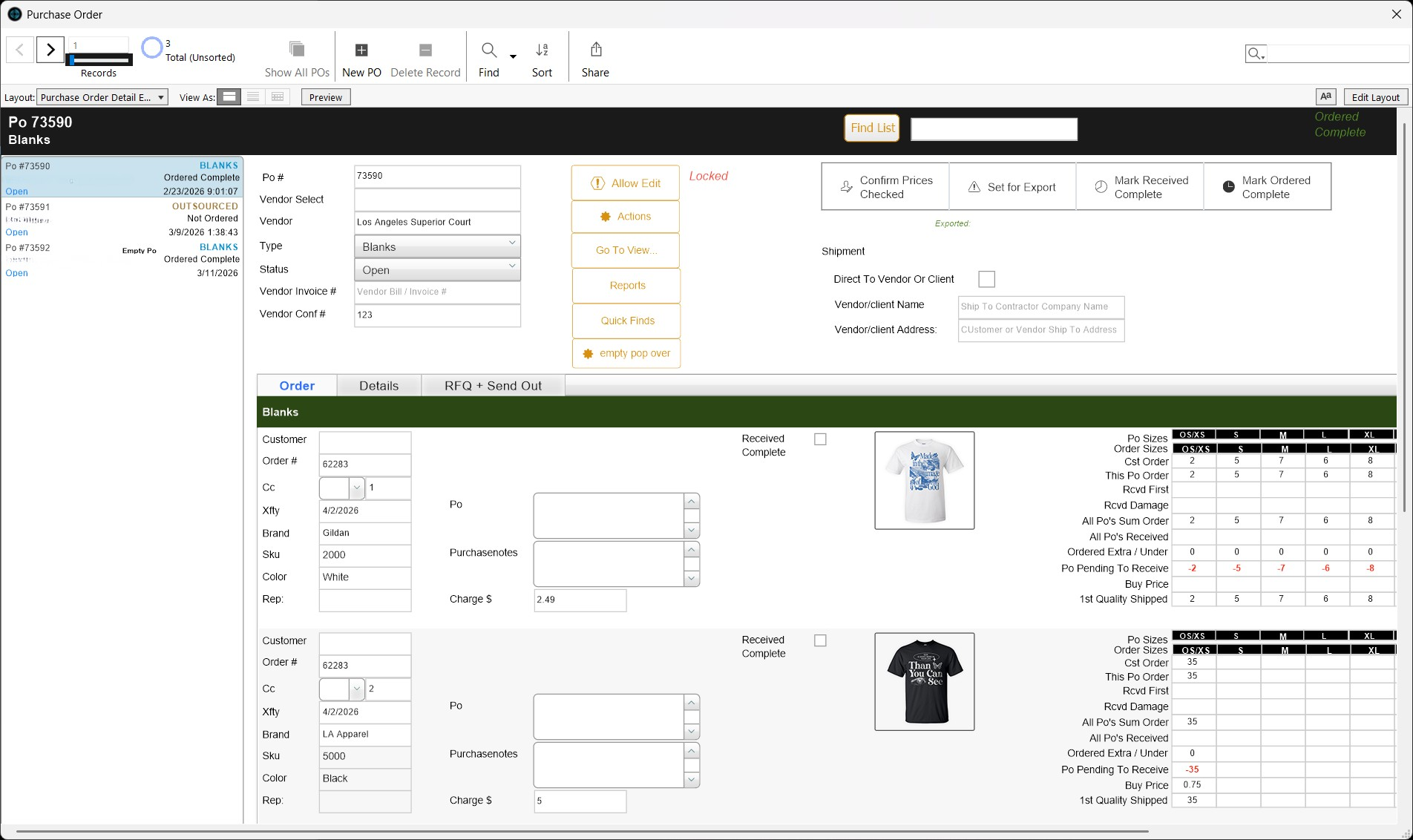
We track your blanks by style, color, and size, wired straight into your orders and production. What's in stock, what's allocated, what needs reordering, in real time. No spreadsheets. No shelf counts. Thousands of SKU combinations, already running in real operations.
A print shop inventory management system for apparel decorators. Set up, run, and kept accurate by us, your tech team.
We set it up. We run it. Stockouts stop before they start.
What Is Inventory Management for Print Shops?
In simple terms, inventory management for print shops replaces spreadsheets and shelf counts with a system that tracks stock as it is received, allocated, and used. For member shops, we build it, run it, and keep it accurate.
Unlike generic inventory apps (Sortly, Zoho Inventory, spreadsheets), a print shop inventory system needs to handle the complexity specific to apparel decoration:
Size/color combinations
Tracking a Comfort Colors 1717 across 47 colors and 8 sizes is thousands of individual SKU counts
Order allocation
Inventory reserved for specific orders so the same blanks aren't promised twice
Vendor relationships
Which vendor supplies which blank, at what price, with what lead time
Production integration
Inventory deducted as jobs complete - not when someone remembers to update a spreadsheet
Automatic reordering
Purchase orders generated when stock drops below your threshold
Data insights
See which SKUs move fastest, identify dead stock, optimize reorder timing
Inventory alone doesn't fix the problem - see everything we run inside the complete print shop management system. If your main issue is backend operations, start with the FileMaker system we run.
What Print Shop Inventory Problems Actually Look Like
If any of these sound familiar, your inventory process is the problem.
You find out you're out of black mediums when the job is already on the press.
Not last week. Right now - screens burned, team set up, customer expects Friday. The count was updated three days ago. Two orders pulled from the same stock since.
Inventory counts are updated after the problem - not before.
Someone walks to the shelf, counts, updates the spreadsheet. By the time they're done, another order pulled from the same stock. The count is already wrong.
You're overstocked on SKUs nobody orders.
400 ash gray XXLs from six months ago. Meanwhile, you're constantly short on black mediums and navy larges - the blanks customers actually order.
Purchase orders are created from memory.
Someone notices a shelf looks low. Maybe checks the spreadsheet. Calls the vendor. Orders what they think is right. No data on reorder points. No history.
Your website sells blanks you don't have.
Customer orders 100 pieces of a style that's been out of stock for two weeks. Nobody updated the website. Now you're apologizing and losing trust.
Inventory We Run, Connected to Your Entire Operation
This is not tracking you babysit. Order created, stock checked. Blanks received, counts update. Job completes, inventory adjusts. Threshold hit, PO goes out. We set it up. We keep it accurate.
Thousands of style, color, and size combinations, tracked in real time. Not after someone walks to the shelf and counts.
How the Print Shop Inventory System We Run Works
Receive
Blanks arrive. Your team receives them into the system we run - counts verified against the PO. Stock updates immediately. Discrepancies flagged.
Track
We track every SKU by style, color, and size. Available stock, allocated stock, and total on hand. The real number - not just what's on the shelf.
Allocate
Order created? The system checks inventory and reserves blanks. Allocated stock can't be double-sold or pulled for another job.
Reorder
Stock below threshold? A PO goes out automatically - vendor, quantities, pricing, lead time pre-filled. We set the thresholds with you. No guessing, no forgetting.
Produce
Production completes tasks, inventory adjusts. Blanks used are deducted. Waste logged. The count reflects reality.
Report
Inventory levels, turnover rates, reorder history, dead stock - on demand. Know which SKUs move, which sit, which vendors deliver on time.
Before & After
Before - Manual Inventory
- closeStock counted by hand, usually after running out
- closeSpreadsheet updated days after the count
- closeSame blanks promised to multiple orders
- closePurchase orders created from memory
- closeWebsite shows items that are out of stock
- closeNo visibility into what moves and what sits
After - Inventory Your Tech Team Runs
- checkStock updated in real time as blanks are received and used
- checkAllocation prevents double-selling
- checkAuto-generated POs at reorder thresholds
- checkWebsite hides out-of-stock items automatically
- checkReports show turnover, dead stock, and reorder timing
- checkThousands of SKU combinations tracked without spreadsheets
How Inventory Connects to Everything Else
Inventory in isolation is counting. Connected to your orders, website, production, and vendors, it becomes operational intelligence. One piece of the production operating system we run for member shops.
Connected to your orders
When an order is created, the system checks availability and allocates stock. If you have 200 tees and a customer orders 200, you know immediately - and a PO is triggered if you're short.
Connected to your website
We hide out-of-stock items from the storefront we run for you - automatically. Customers don't order what you can't deliver. When replenished, items reappear. No manual updates.
Connected to production
As decoration tasks complete, inventory adjusts. Blanks used in production are deducted. Your count always reflects what's actually available - not last Tuesday's number.
Connected to your vendors
Reorder thresholds trigger POs to the right vendor, at the right price, with the right quantities. When received, stock updates and blanks are immediately available.
This is how inventory management for print shops should work - as part of a complete system we run, not a standalone app. If your website and warehouse are out of sync, see how the ecommerce storefront we run connects automatically.
What Happens After You Are Approved
SKU Setup
We import your product catalog - every style, color, and size.
Vendor Config
We set up your vendors, pricing, lead times, and reorder thresholds.
Data Import
We load your current stock levels into the system.
Training
Receiving, allocation, POs - we train your team on every workflow.
Go Live
Real inventory tracked from day one, connected to orders. We run it from here.
Built For Shops With Inventory They Can't Track by Hand
Shops tracking 500+ SKU combinations
Multiple brands, dozens of styles, hundreds of color/size combos. Spreadsheets broke a long time ago.
Shops that run out mid-production
If your team has ever stopped a press because blanks weren't there, you need real-time inventory with allocation.
Shops with multiple vendors
SanMar, S&S, Alpha Broder - different vendors for different blanks. One system to track them all.
Shops where website and warehouse are out of sync
If customers order blanks you don't have, you need inventory that syncs with your storefront automatically.
Frequently Asked Questions
What is a print shop inventory system?
expand_more
A print shop inventory system tracks blank apparel and supplies by style, color, and size - and connects that data to orders, production, and vendor management. In the Shop Titan network, we run it for you. It replaces spreadsheets and manual counts with real-time tracking and automatic reordering that we set up and keep accurate.
Can this track blanks by size and color?
expand_more
Yes. We track every style × color × size combination as an individual SKU. The apparel inventory tracking system we run handles thousands of combinations across multiple brands and vendors.
Does it generate purchase orders automatically?
expand_more
Yes. When stock drops below your reorder threshold, the system we run generates a purchase order with the correct vendor, quantities, and pricing pre-filled. You approve and send.
Can inventory connect to my website?
expand_more
Yes. We connect inventory to the storefront we run for you. Out-of-stock items are hidden automatically. When stock is replenished, items reappear. No manual updates needed.
How does allocation work?
expand_more
When an order is created, the system reserves the blanks needed. Those blanks are marked as allocated - they can't be sold to another customer or pulled for a different job. You always know what's truly available.
Can this replace my inventory spreadsheet?
expand_more
Yes. That's exactly what the screen printing inventory system we run is built to replace. Stock levels, vendor data, PO history, receiving logs - everything in a connected system where counts update automatically and we keep it accurate.
Does inventory work on its own?
expand_more
The inventory module is part of the Shop Titan FileMaker system we run for member shops. It works best connected to orders, production, and your website - as part of the complete system.
How long does setup take after approval?
expand_more
Inventory configuration is part of the overall setup we handle for approved shops - typically 2-4 weeks. We import your product catalog, set reorder thresholds, and configure vendor data during onboarding.
What makes this different from Sortly or Zoho Inventory?
expand_more
Generic inventory apps track numbers, and you run them yourself. This print shop inventory system tracks availability - allocated vs. available stock, connected to orders, production, and your website - and we run it as your tech team. It's built for apparel decoration workflows, not retail or warehouse generics.
Never Run Out of Blanks Again. We'll See to It.
Apply, and inventory becomes our job. Allocation, automatic POs, real-time stock, synced with orders and production. We take on a limited number of shops.